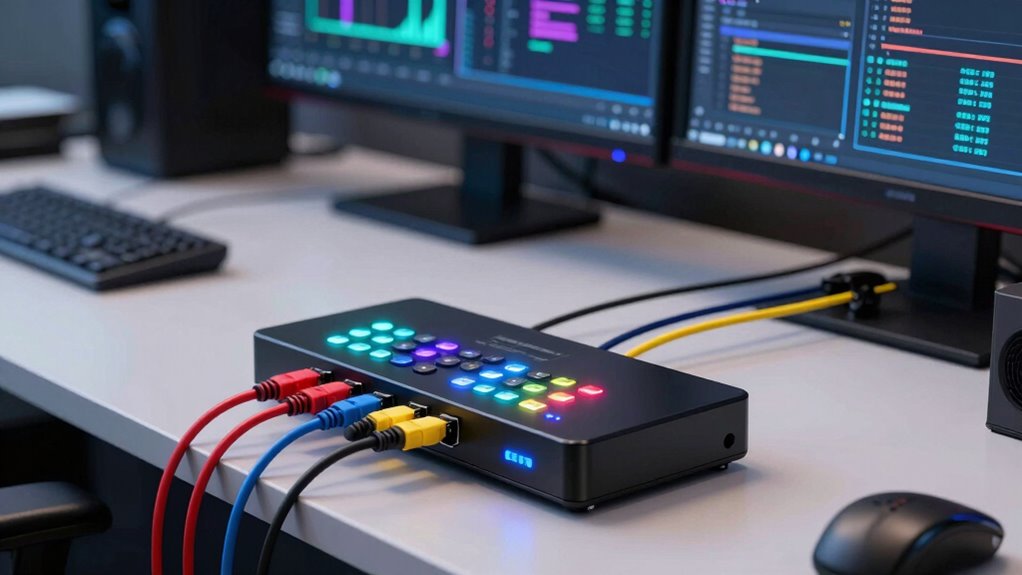

A KVM switch for a multi-machine crypto desk can let you control several computers from one keyboard, mouse, and display setup, but the right choice depends on how many machines and screens you need to share. My best overall pick is the UGREEN 4-Computer HDMI KVM with 6 USB Ports, which balances four-computer support, 4K at 60Hz, and extra USB connections. For a desk built around two computers and three displays, the UGREEN 8K three-monitor KVM offers a more specialized layout, while the GL.iNet Comet X stands apart for remote KVM access. The key tradeoffs are display compatibility, the number of connected computers, USB sharing, and whether a desktop or rackmount setup suits your workspace. Read on for the full comparison and guidance on matching a switch to your desk.

Get hardware and tech essentials delivered free with Prime
- Fast, free delivery on millions of items
- Prime Video, Amazon Music and more included
- Member-only deals all year
Key Takeaways
- Four-computer, single-monitor switching is the most balanced fit in this lineup: the UGREEN 4-Computer model pairs 4K at 60Hz with six USB ports.
- Multi-monitor setups narrow the choice: the UGREEN 8K model serves two computers and three monitors, while another model supports three computers and two monitors.
- Eight-port capacity comes with compromises: the TESmart and MT-VIKI rackmount models support eight computers but list 4K at 30Hz and USB 2.0.
- Video connectors can shape the decision: the Greathtek combines HDMI, DisplayPort, and USB-C inputs for four computers, which may suit mixed-output systems better than an HDMI-only switch.
- Remote access is a separate use case: the GL.iNet Comet X offers remote KVM functionality rather than the conventional shared-monitor setup that defines most of this roundup.
| UGREEN 8K HDMI KVM Switch for 2 Computers and 3 Monitors |  | Best for a Three-Monitor Trading Desk | Computers supported: 2 | Monitor outputs: 3 | Video ports: 2 × DisplayPort 1.4, 1 × HDMI 2.1 | VIEW ON AMAZON | See Our Full Breakdown |
| Hearvo 4-Port USB 3.0 HDMI KVM Switch for 4 Computers and 1 Monitor |  | Best Value for Four Hosts | Computers supported: 4 | Monitors supported: 1 | Video connection: HDMI | VIEW ON AMAZON | See Our Full Breakdown |
| TESmart 8-Port HDMI KVM Switch, 4K@30Hz, USB 2.0, with 8 KVM Cables |  | Best for an Eight-Machine Bench | Computers supported: 8 | Display output: 1 × HDMI | Maximum resolution: 3840 × 2160 at 30Hz | VIEW ON AMAZON | See Our Full Breakdown |
| JideTech 8-Port HDMI USB KVM Switch, 4K at 30 Hz, Rackmount |  | Best Rackmount Pick for a Fixed Workstation | Computers supported: 8 | Video connection: HDMI | Maximum resolution: 4K at 30Hz | VIEW ON AMAZON | See Our Full Breakdown |
| GL.iNet Comet X (GL-RM4PE) Quad-Port Remote KVM |  | Best for Remote Server Access | Host connections: 4 | Video inputs: 4 × HDMI | HDMI loop-out: Up to 4K at 30Hz | VIEW ON AMAZON | See Our Full Breakdown |
| UGREEN 4-Computer HDMI KVM Switch with 6 USB Ports, 4K@60Hz |  | Best for a Four-System USB-Heavy Desk | Computer inputs: 4 | Monitor outputs: 1 | USB ports: 6: 4 USB 3.0 and 2 USB 2.0 | VIEW ON AMAZON | See Our Full Breakdown |
| HDMI KVM Switch for 3 Computers and 2 Monitors, 4K@60Hz, 4 USB 3.0 Ports |  | Best for a Dual-Monitor Three-Machine Desk | Computers supported: 3 | Monitors supported: 2 | Video connections: HDMI | VIEW ON AMAZON | See Our Full Breakdown |
| MT-VIKI 8-Port HDMI KVM Switch, 4K@30Hz, 1U Rack Mount |  | Best for Eight-Machine Rack Setups | Computer ports: 8 | Video interface: HDMI | Maximum resolution: 4K at 30Hz | VIEW ON AMAZON | See Our Full Breakdown |
| Yinker 1U Rackmount KVM Console VGA 8 Port + 8 KVM Cables, 8×1 USB VGA KVM Switch + 4 USB Hubs + Wired Desktop Selector + Rack Mount Ears |  | Best for Legacy VGA Machines | Computer positions: 8 | Video interface: VGA | Resolution support: Up to 1920×1440 | VIEW ON AMAZON | See Our Full Breakdown |
| Greathtek 4K@60Hz HDMI DisplayPort USB-C KVM Switch for 4 Computers and 1 Monitor |  | Best for Mixed-Connection Computers | Computers supported: 4 | Monitor outputs: 1 | Video connections: 2 HDMI, 1 DisplayPort, and 1 USB-C (Thunderbolt) | VIEW ON AMAZON | See Our Full Breakdown |
| kvm switch for multi machine crypto desk | Maximum resolution | Switching methods | Computers supported |
|---|---|---|---|
| UGREEN 8K HDMI KVM Switch for | 8K at 60Hz | Push button, desktop controller | 2 |
| Hearvo 4-Port USB 3.0 HDMI KVM | 4K at 60Hz | On-device push button, wired remote | 4 |
| TESmart 8-Port HDMI KVM Switch | 3840 × 2160 at 30Hz | IR remote, front panel, keyboard hotkeys, mouse wheel, RS232, IP commands, auto-detect | 8 |
| JideTech 8-Port HDMI USB KVM S | 4K at 30Hz | Hotkeys, push buttons | 8 |
| GL.iNet Comet X | — | — | — |
| UGREEN 4-Computer HDMI KVM Swi | 4K at 60Hz | Panel button or wired desktop controller | — |
| HDMI KVM Switch for 3 Computer | 4K at 60Hz | Panel button or included wired controller | 3 |
| MT-VIKI 8-Port HDMI KVM Switch | 4K at 30Hz | Panel buttons, wired desktop selector, and IR remote | — |
| Yinker 1U Rackmount KVM Consol | — | — | — |
| Greathtek 4K@60Hz HDMI Display | 4K at 60Hz | Front buttons or wired remote with LED status indicators | 4 |
More Details on Our Top Picks
UGREEN 8K HDMI KVM Switch for 2 Computers and 3 Monitors
For a crypto desk where charts, wallet tools, and monitoring dashboards need separate screens, this UGREEN is the most display-focused pick in this group. It switches two computers across three monitors and shares four USB 3.0 peripherals, so one button or desktop controller can hand over the full workspace. Its 8K-at-60Hz capability and support for HDR10+, VRR, FreeSync, and G-Sync offer more headroom than the TESmart and JideTech eight-computer switches, which top out at 4K at 30Hz. The tradeoff is host compatibility: both computers must support three displays and the required mix of ports, and there is no EDID emulation or keyboard hotkey switching. I’d choose it for a two-machine, multi-screen desk, not a large server bench.
Pros:- Shares three monitors and four USB 3.0 peripherals between two computers.
- Supports up to 8K at 60Hz, plus HDR10+, VRR, FreeSync, and G-Sync.
- Includes a desktop controller for switching without reaching behind the unit.
- Plug-and-play operation with Windows and Linux.
Cons:- Both computers need support for three displays and the required video ports.
- Does not support keyboard hotkey switching.
- No EDID emulation to help preserve display behavior during switching.
Best for: Crypto traders or operators using two compatible computers and three monitors who want to share a high-resolution workspace and USB peripherals.
Not ideal for: People switching among three or more computers, or users whose computers cannot drive three displays through the required DisplayPort and HDMI connections.
- Computers supported:2
- Monitor outputs:3
- Video ports:2 × DisplayPort 1.4, 1 × HDMI 2.1
- Maximum resolution:8K at 60Hz
- USB ports:4 × USB 3.0
- Switching methods:Push button, desktop controller
- Display modes:Mirror, extend
- Operating systems:Windows, Linux
Our verdict“Choose this UGREEN if your two-machine crypto desk depends on three shared monitors; pick an eight-host model instead if machine count matters more.”
Hearvo 4-Port USB 3.0 HDMI KVM Switch for 4 Computers and 1 Monitor
The Hearvo suits a desk that needs to rotate between several machines but can work from one shared monitor. Four host connections make it a more practical fit than the two-computer UGREEN when a trading setup includes a primary workstation, a backup machine, and additional systems. It supports 4K at 60Hz, and the mix of three USB-A ports and one USB-C port can accommodate common peripherals without a separate USB hub. Adaptive EDID and a wired remote also make everyday switching straightforward. Its limitation is the single-display layout: unlike the UGREEN, it cannot keep charts spread across three screens, and the one-monitor design means every host shares that same viewing area. I’d favor it for a compact four-machine desk, not a multi-monitor command station.
Pros:- Switches one monitor and shared peripherals among up to four computers.
- Supports 4K at 60Hz and HDCP 2.2.
- Offers both front-panel push-button and wired remote switching.
- Adaptive EDID and plug-and-play setup reduce setup friction.
Cons:- Supports only one shared monitor.
- The package includes one HDMI cable, so additional video cabling may be needed for the full setup.
Best for: Crypto operators with up to four PCs or laptops who need to share one 4K monitor, keyboard, mouse, and other USB devices.
Not ideal for: Users who need multiple monitors per host or want to keep dashboards visible across a three-screen workspace.
- Computers supported:4
- Monitors supported:1
- Video connection:HDMI
- Maximum resolution:4K at 60Hz
- USB ports:4: 3 USB-A and 1 USB-C
- USB data transfer:Up to 5Gbps
- Switching methods:On-device push button, wired remote
- Power supply:5V
Our verdict“Pick the Hearvo when four-host switching and 4K at 60Hz matter more than a multi-monitor layout.”
TESmart 8-Port HDMI KVM Switch, 4K@30Hz, USB 2.0, with 8 KVM Cables
When a crypto operation has many dedicated machines, the TESmart’s eight host inputs and included KVM cables reduce the work of connecting a crowded bench. Its standout advantage over the similarly sized JideTech is switching flexibility: this model lists remote, hotkey, mouse-wheel, RS232, IP command, front-panel, and auto-detect options. EDID emulation can help keep a monitor from repeatedly rearranging its display behavior as hosts change. The compromise is a 4K ceiling of 30Hz and USB 2.0 hub ports, which are less suited to fluid high-refresh desktop work or fast peripheral transfers than the Hearvo’s 4K-at-60Hz USB 3.0 setup. I’d rank this ahead of a simpler eight-port switch when management options matter, but not for a desk built around one high-refresh display.
Pros:- Controls up to eight computers from one keyboard, mouse, and HDMI display.
- Includes eight 5-foot KVM cables.
- EDID emulation helps preserve display settings while switching hosts.
- Offers seven switching methods, including hotkeys, IP commands, and auto-detect.
Cons:- Maximum resolution is 4K at 30Hz.
- USB hub ports use USB 2.0 rather than USB 3.0.
- AAA batteries for the remote are not included.
Best for: Crypto infrastructure teams or advanced users who need to switch among as many as eight HDMI systems from one console.
Not ideal for: Users who prioritize 4K at 60Hz, high-refresh gaming displays, or faster USB peripheral transfers.
- Computers supported:8
- Display output:1 × HDMI
- Maximum resolution:3840 × 2160 at 30Hz
- USB hub ports:2 × USB 2.0
- Switching methods:IR remote, front panel, keyboard hotkeys, mouse wheel, RS232, IP commands, auto-detect
- Included cables:8 × 5-foot KVM cables
- Audio output:HDMI
- Warranty:3 years
Our verdict“Choose the TESmart for an eight-host crypto bench where flexible control and included cables outweigh 4K refresh rate and USB speed.”
JideTech 8-Port HDMI USB KVM Switch, 4K at 30 Hz, Rackmount
The JideTech is the more straightforward rackmount choice for a crypto desk that already has a rack or equipment cabinet and needs eight computers on one console. Its metal housing and rack-mount format suit a fixed installation better than the desk-oriented Hearvo, while hotkeys and front-panel buttons cover the main ways many users switch hosts. It also supports Windows, Mac, Linux, Unix, DVR, and NVR systems, making it a flexible fit for mixed equipment. Compared with the TESmart, however, the listed controls are simpler: there is no stated IP command, RS232, auto-detect, or EDID emulation. Both are limited to 4K at 30Hz, and this JideTech’s USB 2.0 support makes it a poor match for workflows that move data through shared peripherals.
Pros:- Controls up to eight computers from one workstation.
- Rack-mount design and metal construction suit fixed equipment installations.
- Supports hotkey and front-panel switching.
- Compatible with Windows, Mac, Linux, Unix, DVR, and NVR systems.
Cons:- Maximum supported refresh rate is 30Hz at 4K.
- USB 2.0 limits shared peripheral data speeds.
- Lists fewer switching and management options than the TESmart eight-port model.
Best for: Crypto mining or server-room operators with a rack-mounted setup who need one keyboard, mouse, and monitor for up to eight systems.
Not ideal for: Desk users without rack space, or anyone who needs 4K at 60Hz, USB 3.0 transfer speeds, or advanced remote switching methods.
- Computers supported:8
- Video connection:HDMI
- Maximum resolution:4K at 30Hz
- USB standard:USB 2.0
- Switching methods:Hotkeys, push buttons
- Mounting type:Rack mount
- Dimensions:9.44 × 20.07 × 4.72 inches
- Compatibility:Windows, Mac, Linux, Unix, DVR, NVR
Our verdict“Pick the JideTech if you want a rack-mounted eight-host switch with simple local controls and can accept 4K at 30Hz.”
GL.iNet Comet X (GL-RM4PE) Quad-Port Remote KVM
The Comet X serves a different need from the monitor-sharing switches: it is built for browser-based remote control of four computers or servers over an HTTPS interface. That makes it a stronger fit than the TESmart or JideTech when systems sit in a rack or another room and local access is inconvenient. Power over Ethernet can reduce cabling at the device, while 5V USB-C provides a backup power option; a touchscreen and HDMI loop-out preserve local access when someone is at the desk. The tradeoff is that this is not a high-refresh, multi-monitor desktop KVM: its loop-out tops out at 4K at 30Hz, and it has only four host connections, half the capacity of the eight-port switches. I’d choose it for remote administration, not for a three-screen trading console.
Pros:- Provides browser-based remote control through an HTTPS interface.
- PoE can power the unit over its network connection, with USB-C backup power available.
- Includes HDMI loop-out for local display and USB keyboard and mouse control.
- Adds a touchscreen, rack-mount brackets, and 64GB of onboard eMMC storage.
Cons:- HDMI loop-out is limited to 4K at 30Hz.
- Supports four dedicated host connections, fewer than the TESmart and JideTech.
- Its remote-management focus does not replace a multi-monitor desktop KVM.
Best for: Crypto infrastructure operators who need browser-based HTTPS access to up to four computers or servers, including systems mounted away from the desk.
Not ideal for: Traders who need a shared multi-monitor setup, more than four hosts, or 4K output above 30Hz.
- Host connections:4
- Video inputs:4 × HDMI
- HDMI loop-out:Up to 4K at 30Hz
- Power:PoE or 5V USB-C
- Network interface:RJ45, 1000Mbps
- Onboard storage:64GB eMMC
- Touchscreen:3.69-inch TFT
- Dimensions:170 × 90 × 40 mm
Our verdict“Choose the Comet X when remote HTTPS access to a small group of crypto systems matters more than local multi-monitor switching.”
UGREEN 4-Computer HDMI KVM Switch with 6 USB Ports, 4K@60Hz
For a crypto desk with several machines but just one display, this UGREEN balances four computer inputs with a useful six-port USB hub. The 4K at 60Hz support and EDID emulation suit a main monitor where preserving display settings between switches matters; a wired controller also lets me switch without reaching behind the computers. Compared with the MT-VIKI 8-Port, it supports a smoother 60Hz 4K signal but handles half as many computers. It also offers more USB connections than the three-computer, dual-monitor HDMI KVM, though that rival is the better fit when two displays are non-negotiable. The tradeoff is setup: each computer needs HDMI and USB-A-to-C connections, and I have to supply the HDMI cables and power adapter. Docking stations are not supported.
Pros:- Shares one monitor and up to six USB devices across four computers.
- Supports 4K at 60Hz with HDMI 2.0.
- EDID emulation helps retain display settings when switching.
- Offers both a panel button and wired desktop controller.
Cons:- HDMI cables and power adapter are not included.
- Every computer needs separate HDMI and USB-A-to-C data connections.
- Does not support docking stations.
Best for: Crypto operators running up to four directly connected computers who want to share one 4K monitor and several USB peripherals.
Not ideal for: Buyers who rely on docking stations, need two monitors, or want a ready-to-connect kit with HDMI cables and a power adapter included.
- Computer inputs:4
- Monitor outputs:1
- USB ports:6: 4 USB 3.0 and 2 USB 2.0
- USB port layout:5 USB-A and 1 USB-C
- Maximum resolution:4K at 60Hz
- USB 3.0 transfer speed:Up to 5Gbps
- Switching methods:Panel button or wired desktop controller
- Display features:EDID emulation, HDMI 2.0, HDCP 2.2/1.4, 3D, HDR
- Included cables and adapter:HDMI cables and power adapter not included
Our verdict“Choose this UGREEN if four directly connected machines and a shared USB-heavy, single-monitor desk matter more than dual displays or included cables.”
HDMI KVM Switch for 3 Computers and 2 Monitors, 4K@60Hz, 4 USB 3.0 Ports
When a crypto workstation needs two screens, this switch has a clearer purpose than single-monitor picks such as the UGREEN 4-Computer HDMI KVM. It shares two HDMI monitors and four USB 3.0 devices among three computers, with extended or duplicate display modes and EDID simulation to help keep windows in place after a switch. The included wired controller gives me an accessible alternative to the panel button. Its 4K at 60Hz capability also exceeds the MT-VIKI 8-Port’s 4K at 30Hz ceiling, although the MT-VIKI accommodates more machines and includes its KVM cables. This model demands a more involved video hookup: dual-screen operation needs two HDMI connections per computer, alongside USB, and a 12V power adapter for stable operation. Keyboard hotkeys are not supported, so switching still requires a button or controller.
Pros:- Shares two monitors and four USB 3.0 devices across three computers.
- Supports 4K at 60Hz and extended or duplicate display modes.
- EDID simulation helps preserve window arrangement when switching.
- Includes both a panel button and wired controller.
Cons:- Dual-monitor use requires two HDMI connections per computer, plus USB.
- A 12V power adapter is required for stable operation.
- Does not support keyboard shortcut switching.
Best for: Operators with three computers who actively use two HDMI displays and want to share USB 3.0 peripherals across them.
Not ideal for: People with a single-monitor setup, computers without two available HDMI connections, or users who expect keyboard-hotkey switching.
- Computers supported:3
- Monitors supported:2
- Video connections:HDMI
- Maximum resolution:4K at 60Hz
- USB ports:4 USB 3.0
- USB data transfer rate:Up to 5Gbps
- Display modes:Extended and duplicate
- Switching methods:Panel button or included wired controller
- Power and EDID:12V 1A adapter; EDID simulation
Our verdict“Pick this model when two-screen operation for three machines is the priority and your computers have the required HDMI and USB connections.”
MT-VIKI 8-Port HDMI KVM Switch, 4K@30Hz, 1U Rack Mount
The MT-VIKI makes the most sense when the desk is really a rack-backed control station: it connects up to eight computers, mounts in a 1U space, and includes eight HDMI/USB KVM cables. That bundle and the three switching options—panel buttons, wired selector, and IR remote—make it more ready for a densely populated multi-machine setup than the UGREEN four-computer switch, which targets a smaller desk and higher refresh rate. Here, 4K tops out at 30Hz, so the video experience is less fluid than 60Hz options in this roundup. The four-port USB 2.0 hub also favors basic shared peripherals over faster data transfers. For crypto monitoring and administration across many machines, port count and rack hardware may matter more than refresh rate; for fast desktop work on a 4K screen, I would choose a 60Hz model instead.
Pros:- Controls up to eight computers from one monitor, keyboard, and mouse.
- Includes eight HDMI/USB KVM cables, rack hardware, and power adapter.
- Offers panel buttons, a wired desktop selector, and an IR remote.
- Plug-and-play operation supports Windows, macOS, and Linux.
Cons:- 4K output is limited to 30Hz.
- The built-in hub uses USB 2.0 rather than USB 3.0.
- The 1U rack-mount format may not suit a compact desk.
Best for: Crypto operators with five to eight computers, a 19-inch rack, and a preference for supplied KVM cables and several ways to switch.
Not ideal for: Users who need 4K at 60Hz, fast USB peripheral transfers, or a compact desktop-only device.
- Computer ports:8
- Video interface:HDMI
- Maximum resolution:4K at 30Hz
- USB hub:4-port USB 2.0
- Mounting:1U, 19-inch rack mount
- Switching methods:Panel buttons, wired desktop selector, and IR remote
- Compatibility:Windows, macOS, and Linux
- Power:10 watts
- Included accessories:8 HDMI/USB KVM cables, desktop selector, IR remote, rack ears and screws, power adapter, and manual
Our verdict“Choose the MT-VIKI when eight-machine capacity and rack-ready cabling outweigh the lower 4K refresh rate and USB 2.0 hub.”
Yinker 1U Rackmount KVM Console VGA 8 Port + 8 KVM Cables, 8×1 USB VGA KVM Switch + 4 USB Hubs + Wired Desktop Selector + Rack Mount Ears
Yinker is the legacy-system choice in this lineup, not a match for a modern high-resolution crypto desk. It controls eight VGA computers and includes the eight VGA/USB cables, rack ears, and a wired selector, which reduces sourcing work for an existing rack. The four built-in USB hubs allow shared USB devices such as speakers, but video is capped at 1920×1440. That makes it a poor substitute for the MT-VIKI 8-Port HDMI KVM, whose HDMI connection supports 4K at 30Hz, or the UGREEN four-computer model’s 4K at 60Hz. Yinker’s simpler appeal is using established VGA systems without HDMI conversion or an added power adapter for basic operation. I would reserve it for older machines that already output VGA; a modern multi-machine desk should favor an HDMI or DisplayPort-capable option.
Pros:- Controls up to eight computers through one set of peripherals.
- Includes eight VGA/USB cables and a wired desktop selector.
- Four built-in USB hubs can share USB peripherals such as speakers.
- Plug-and-play basic operation does not require an additional power adapter.
Cons:- VGA-only video excludes HDMI and DisplayPort systems without conversion.
- Resolution support is limited to 1920×1440.
- Less suitable for modern high-resolution displays than the MT-VIKI HDMI alternative.
Best for: Crypto operators maintaining up to eight older VGA-equipped computers in a rack and sharing a keyboard, mouse, and USB peripherals.
Not ideal for: Buyers with HDMI or DisplayPort systems, modern high-resolution monitors, or a need for 4K output.
- Computer positions:8
- Video interface:VGA
- Resolution support:Up to 1920×1440
- Operating voltage:5 V DC
- Mounting:Rack mount
- USB hubs:4 built-in USB hubs
- Included computer cables:8 VGA/USB cables
- Switching control:Push button and wired desktop selector
- Dimensions:15.55 × 6.69 × 3.74 inches
Our verdict“Choose Yinker only when your eight rack-mounted machines already use VGA and compatibility with older hardware matters more than resolution.”
Greathtek 4K@60Hz HDMI DisplayPort USB-C KVM Switch for 4 Computers and 1 Monitor
Greathtek’s distinguishing advantage is not simply four-computer switching; it is the mix of HDMI, DisplayPort, and USB-C inputs for a desk where machines do not share the same video connector. It supports 4K at 60Hz and adds a dedicated USB-C peripheral port alongside USB 3.0, while front buttons and a wired remote with LED indicators make the active connection visible. That flexibility gives it a different role from the UGREEN 4-Computer HDMI KVM, which also supports four systems and 4K at 60Hz but uses an HDMI-centered setup and specifies six USB ports. Greathtek is the better match for a varied laptop-and-desktop mix, but the supplied data does not spell out the number of each USB port or the per-computer cabling requirements. It also lacks hotkey switching, needs external power, and is listed as incompatible with ultra-wide and curved monitors.
Pros:- Supports four computers and 4K at 60Hz.
- Accepts HDMI, DisplayPort, and USB-C video connections.
- Combines USB 3.0 sharing with a dedicated USB-C peripheral port.
- Provides front-button and wired-remote switching with LED indicators.
Cons:- Not compatible with ultra-wide or curved monitors.
- Keyboard hotkey switching is not supported.
- Requires an external power cable.
Best for: Crypto operators switching among four laptops and desktops with a mix of HDMI, DisplayPort, and USB-C video outputs.
Not ideal for: Users with ultra-wide or curved monitors, those who require keyboard hotkeys, or buyers who need a clearly specified USB-port count before choosing.
- Computers supported:4
- Monitor outputs:1
- Video connections:2 HDMI, 1 DisplayPort, and 1 USB-C (Thunderbolt)
- Maximum resolution:4K at 60Hz
- Peripheral sharing:USB 3.0 ports and a dedicated USB-C peripheral port
- Switching methods:Front buttons or wired remote with LED status indicators
- Compatible systems:Windows and macOS
- Power:5 V operating voltage; external power cable required
- Monitor compatibility:Not compatible with ultra-wide or curved monitors
Our verdict“Choose Greathtek for a four-machine desk with mixed video connectors, provided your monitor is not ultra-wide or curved and button-based switching suits you.”
How We Picked
I compared the ten listed models against the practical needs of a multi-machine crypto desk: computer capacity, monitor layout, supported resolution and refresh rate, USB connectivity, and physical fit. I also looked at whether a product addresses a distinct workflow, such as remote access, mixed video connectors, or rack installation. These details affect daily use: a switch that handles more computers may have lower stated display or USB specifications, while a multi-monitor model may support fewer machines.
The ranking gives priority to usable balance and setup fit, not port count alone. The UGREEN four-computer switch leads for its combination of 4K at 60Hz and six USB ports; specialized multi-monitor, remote-access, and rackmount choices follow according to their narrower strengths. Models listing 4K at 30Hz or USB 2.0 rank lower for buyers who value smoother display output or faster shared peripherals, though their larger computer capacity may suit a different desk. Where product details do not specify features such as hotkey behavior, operating-system support, or cable length, I avoid assuming them.
Factors to Consider When Choosing Kvm Switch For Multi Machine Crypto Desk
Before choosing a KVM for a crypto workstation, map the whole desk workflow rather than counting computers alone. These decisions can help prevent a common mismatch: buying a switch with enough inputs but the wrong display layout, connector type, or peripheral support.
Match the switch to your actual display layout
Write down how many computers must connect and how many monitors each computer needs to share through the switch. A two-computer, three-monitor setup is a different requirement from three computers sharing two screens, even though both involve multiple displays. Check whether the product supports the arrangement you want, not just a headline monitor count. Also verify that your intended resolution and refresh rate are supported across the complete connection path, including the computer’s graphics output, cables, and monitor. A mismatch can leave you using a lower setting than expected. If one screen can remain dedicated to a particular machine, a simpler KVM may be a better fit than paying for multi-monitor switching you will not use.
Choose capacity with room for a realistic workflow
Count the computers you expect to control at the desk, then decide whether you need spare inputs for near-term additions. An eight-port switch can reduce the need to replace hardware as a workstation grows, but larger capacity does not automatically mean a better desk experience. In this lineup, some eight-port options list 4K at 30Hz and USB 2.0, a tradeoff that may matter more than unused ports. Consider which machines need frequent, direct access and which can be managed another way. Avoid buying extra capacity simply because it sounds future-proof if it brings a display or peripheral compromise you will notice every day. A compact four-computer switch may be the more practical choice for a fixed, smaller setup.
Treat USB sharing as a separate requirement
A KVM’s USB ports determine what you can share alongside the keyboard and mouse, such as storage devices or other desk peripherals. Make a short list of what must follow the selected computer and what should remain connected to one machine. Port count alone does not tell you the transfer performance; check the listed USB standard if you plan to use devices where speed matters. USB 2.0 can be adequate for basic input devices, but it is a different proposition from USB 3.0 for faster data transfers. Some setups benefit from leaving sensitive or frequently accessed peripherals attached directly to a dedicated machine. This reduces switching dependencies and makes it clearer which computer receives a device.
Check every video connector before choosing a mixed-input model
List the video outputs on each computer before selecting a switch, especially if the desk combines desktops, laptops, or small-form-factor systems. An HDMI-only KVM may require adapters for a machine with DisplayPort or USB-C output, and adapters can add cost, clutter, and compatibility questions. A mixed-connector model may reduce that friction, but confirm which input types it provides for each computer rather than assuming every port supports every connection. For USB-C, check whether the computer’s port supports the video function required by your setup. Match the switch’s resolution and refresh-rate specifications to the displays you actually use. This check often matters more than a broad label such as “4K.”
Decide whether desktop switching or remote KVM fits your security routine
A conventional KVM changes which local computer uses shared desk peripherals; a remote KVM serves a different access pattern. Remote control may be useful when a machine is located elsewhere or needs access without a local monitor and keyboard, but it is not automatically a replacement for a multi-monitor desk switch. For a crypto desk, separate the convenience question from the security question: decide which machines may be reached remotely and what access controls your environment requires. Keep recovery and maintenance needs in mind, including how you will regain access if the remote path or network is unavailable. Do not assume a remote feature supplies safe account practices on its own. Choose the remote approach only when it matches your infrastructure and access policy.
Plan the physical installation and cable path
Measure the available desk or rack space and trace where each computer, monitor, and peripheral cable will run. Rackmount switches can help centralize a larger setup, but only make sense if your installation has compatible rack space and a useful cable route. Long or crowded cable runs can complicate a neat desk and make troubleshooting slower. Check whether the listed bundle includes the KVM cables you need, and confirm their connector types and reach before ordering. For a desktop unit, think about whether you can access its selector easily without placing it under equipment. A tidy layout is not just cosmetic: clear cable labeling makes it easier to identify the machine you are controlling.
Frequently Asked Questions
Should I choose a four-port or eight-port KVM for a crypto desk?
Choose based on the number of machines you need to switch between now and the number you are likely to add soon. A four-computer model can offer a better balance of display and USB features for a smaller desk, while an eight-port unit gives more connections but may list lower display or USB specifications. In this roundup, the eight-port HDMI options specify 4K at 30Hz and USB 2.0, so compare those limits with your actual display and peripheral needs. Also count machines that truly need shared controls; not every device has to connect to the same KVM. Spare ports are useful only if they do not force a feature compromise you dislike.
Will a KVM switch let me keep different monitors assigned to different computers?
That depends on the switch’s supported monitor arrangement, not just the number of monitor ports listed. This roundup includes options designed for two computers and three monitors, and another listed for three computers and two monitors; these serve different desk layouts. Confirm how the switch routes each computer’s video to each screen before purchase. If you want one monitor to stay permanently connected to a particular machine, verify whether the setup supports that arrangement without changing your workflow. Do not assume a multi-monitor KVM duplicates or independently routes displays in the way you expect. Check the product’s connection diagram against your intended layout.
Is 4K at 30Hz enough for a workstation monitor?
It can be adequate for text-focused work if you are comfortable with the display’s motion and refresh behavior, but it is not equivalent to 4K at 60Hz. The distinction can be more noticeable when scrolling, moving windows, or using a display that is set up for a higher refresh rate. Several high-port-count options in this lineup list 4K at 30Hz, while the UGREEN four-computer model and other choices list 4K at 60Hz. Check your monitor’s native settings and how you use it before trading refresh rate for extra computer inputs. Also confirm that the computer, cables, and KVM all support the target mode.
Do I need a rackmount KVM for several computers?
No. Rackmount construction is useful when your computers and switching hardware are already organized in a rack, or when centralizing equipment is part of the desk plan. It does not by itself improve switching or display performance, and it may be awkward in a desk-only setup without suitable rack space. The roundup’s rack-oriented models emphasize eight-computer capacity, with listed 4K at 30Hz on several options. Compare the physical format, included cables, and supported display mode against your installation before choosing one. If the KVM will sit within arm’s reach on a desk, a desktop-style design may be simpler to place and operate.
When does a remote KVM make more sense than a standard KVM switch?
A remote KVM may suit a setup where you need to reach a computer from another location or manage it without attaching a dedicated local monitor and keyboard. A standard KVM is usually the more direct match when several computers share one desk and you switch among them locally. The GL.iNet Comet X is the lineup’s remote-access option, while most other models focus on shared local displays and peripherals. Decide whether remote access is part of your maintenance routine, rather than treating it as a substitute for multi-monitor switching. Before relying on remote control, review how access is protected and plan how you will reach the machine if the network path fails.
Conclusion
For most desks with up to four computers sharing one monitor, I recommend the UGREEN 4-Computer HDMI KVM with 6 USB Ports as the best overall balance of 4K at 60Hz and peripheral connections. The Hearvo 4-Port is a best-value-style alternative for buyers who want four-computer, single-monitor switching without choosing a rackmount setup, while the UGREEN 8K three-monitor model is the best premium-style fit for a two-computer, three-screen desk. Beginners should start by matching computer count, monitor layout, and video connectors; the four-computer UGREEN is the clearest general-purpose starting point when its HDMI connections fit their equipment. For a rack-based system with many machines, compare the TESmart and MT-VIKI eight-port models, accepting their listed 4K at 30Hz and USB 2.0 specifications. Choose the GL.iNet Comet X for remote KVM needs, or the Greathtek when its mix of HDMI, DisplayPort, and USB-C inputs better matches your computers. The right pick is the one that fits your actual display path and access routine, not simply the one with the most ports.