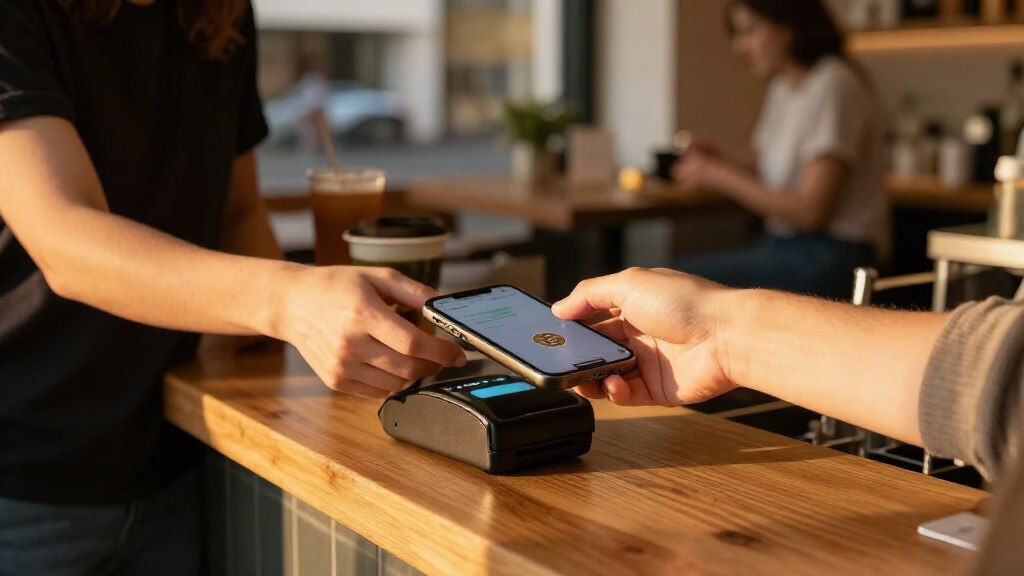

This checklist is for merchants exploring how to accept cryptocurrency and Bitcoin alongside their existing checkout options. It covers equipment that may support payment workflows, while recognizing that hardware alone does not accept crypto: payment processing and the setup connecting each device to your point of sale also matter.

Get hardware and tech essentials delivered free with Prime
- Fast, free delivery on millions of items
- Prime Video, Amazon Music and more included
- Member-only deals all year
The sections follow common checkout roles: payment terminal, NFC card, QR scanning, receipt printing, point of sale tablet, and barcode scanning. Advice-only sections explain what to evaluate when there is no specific product pick; named-product sections focus on what to confirm before choosing that item for your setup.
Use this as a planning checklist, then verify requirements with your payment provider and point of sale system. Check supported connections, software, and operating requirements before buying, and consider how staff will use the equipment during a real checkout. Prioritize compatibility and workflow before adding hardware.
Bitcoin payment terminal
A Bitcoin payment terminal can be part of a checkout, but the device is only one piece of the process. Before selecting hardware, find out how your payment provider handles payment requests, confirmations, refunds, and transaction records. Ask whether it supplies a terminal or supports a particular device, and whether the point of sale system can record crypto payments in the same workflow as other tenders. Provider compatibility should guide the shortlist.
A common mistake is choosing a terminal based on its appearance or general payment capabilities and assuming Bitcoin acceptance will work automatically. Confirm the supported payment methods, required software, network connection, and how staff will know a payment has completed. If you have multiple checkout stations, clarify whether each needs a separate device or configuration. Keep the checkout steps clear for employees and customers, and make sure the process fits your existing receipt and reconciliation practices. Map the workflow first, then compare devices against it.
What to look for:
- Written confirmation of support from your payment provider
- Compatibility with your point of sale system
- Clear payment completion and error indicators
- Network and power requirements for your checkout
- A process for recording, refunding, and reconciling transactions
NFC payment card
An NFC payment card may be relevant when a crypto payment workflow supports tap-based interactions, but the name alone does not establish how the card is issued, funded, or accepted. Ask your provider what the card represents in the transaction and which terminal or app must read it. Confirm whether the experience is designed for customers, employees, or another use, since those roles can call for different setup and handling. Know what the card does before evaluating its convenience.
A frequent buying mistake is assuming any contactless reader will work with any NFC card or payment service. Verify that the reader, card, software, and payment provider are supported together, and ask what happens if a tap fails or the card cannot be read. Consider how staff will explain the checkout and whether the card flow supports the receipts and transaction records your business needs. Test the complete process in the intended environment before relying on it at a busy register. Check the full pairing, including the software path, instead of focusing on the card alone.
What to look for:
- Provider documentation describing the card’s role
- Explicit compatibility with the intended reader and software
- A clear fallback when a tap does not work
- Checkout steps staff can explain consistently
- Transaction records that fit existing reconciliation
QR code scanner
A QR scanner can help staff capture codes presented during checkout, but a barcode scanner is not automatically a crypto payment solution. The Farset F7-WiFi Android 14 Barcode Scanner Handheld Mobile Computer PDA is a named handheld option to investigate; confirm that its scanning capability and software work with the payment flow you plan to use. Ask whether the relevant QR code is displayed on a customer device, printed, or generated through a point of sale app. Match the scan workflow to the actual checkout.
One common mistake is treating QR reading as proof that the scanner can validate or complete a payment. Confirm which application receives the scan, what information it reads, and how staff see the payment status. Check the device’s connectivity and operating requirements with the provider and point of sale vendor, and consider where it will be used around the counter. If you expect staff to carry it between stations, evaluate its handling and charging routine in that context. Test end to end with the intended app and payment provider before adopting it.
What to look for:
- Compatibility of the Android device with the required payment app
- Confirmation that the scanner reads the QR codes in your workflow
- A clear link between scanning and payment status
- Connectivity requirements at each checkout location
- Practical charging and handling arrangements for staff
Farset F7-WiFi Android 14 Barcode Scanner Handheld Mobile Computer PDA
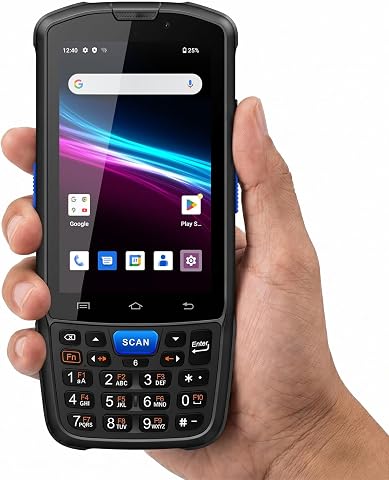
The Farset F7-WiFi is a rugged handheld mobile computer running Android 14, designed for warehouse, retail, and logistics workflows. It features fast 1D/2D/QR barcode scanning, a hot-swappable 5000mAh battery, and IP67 dust and water resistance, making it suitable for demanding environments.
Pros:
- Rugged design with IP67 water and dust resistance
- Fast and reliable barcode scanning for various code types
- Removable battery supports full-shift use and hot swapping
- Supports multiple business applications and connectivity options
Cons:
- Does not support cellular networks (4G/5G)
- Limited to Android 14, may require app compatibility checks
- No mention of camera or additional sensors
Best for: Merchants whose payment app supports a compatible handheld scanner
Not ideal for: Stores expecting QR scanning alone to process payments
Bottom line: Verify the Farset scanner with your payment app and provider before putting it into service.
Thermal receipt printer
A receipt printer can make checkout records easier to provide and organize, but printing is separate from accepting a crypto payment. The Star Micronics mC-Print3 Thermal Receipt Printer is the listed pick; check whether your point of sale system and payment provider support it together. Confirm which transaction details can appear on receipts and whether the printer can be used in the same checkout flow as other payment methods. Receipt integration matters as much as the printer itself.
A common mistake is assuming a printer will connect to every register or automatically include the fields needed for crypto transactions. Ask the point of sale vendor about supported connections, required software, and receipt configuration. Check where the printer will sit, how it will connect to the register, and whether staff can replace paper and handle routine use without interrupting checkout. Also clarify how digital records and printed receipts fit together for reconciliation. Confirm the exact setup with your system vendor before selecting a printer for daily use.
What to look for:
- Compatibility with your point of sale system
- Supported connection options for the intended register
- Receipt fields available for the payment workflow
- A practical placement and paper replacement routine
- How printed receipts relate to digital transaction records
Star Micronics mC-Print3 Thermal Receipt Printer

The Star Micronics mC-Print3 is a high-speed thermal receipt printer capable of printing at 400mm/sec. It features USB-C connectivity, cloud printing support with CloudPrntNext, and is splash-proof and dust-proof, making it suitable for retail and hospitality environments.
Pros:
- Fast printing speed of 400mm/sec
- Supports multiple connectivity options including USB-C, Ethernet, and Bluetooth
- Splash-proof and dust-proof design for durability
Cons:
- Limited to monochrome printing
- Primarily designed for receipt printing, not versatile for other media types
- Requires compatible devices and setup for cloud printing features
Best for: Merchants using a point of sale system that supports this printer
Not ideal for: Businesses without confirmed printer and software compatibility
Bottom line: Check Star Micronics mC-Print3 support and receipt configuration with your point of sale vendor.
Point of sale tablet
A point of sale tablet may serve as the screen for staff to initiate or manage checkout, but crypto acceptance depends on the software and provider connected to it. Start by identifying the point of sale application and asking which tablet models, operating systems, and peripherals it supports. Then confirm whether the payment provider integrates with that application and how a crypto tender appears in the checkout flow. Software support comes first when choosing a tablet.
A common mistake is buying a tablet based on screen size or portability before checking system requirements. Verify the supported operating system, network needs, connection to any scanner or printer, and whether the tablet can be secured and positioned for staff use. Think through the physical workflow: who enters the sale, who presents or scans a payment request, and how staff confirm completion. If you plan to use more than one checkout station, ask how each tablet is configured and kept consistent. Check the whole station, not only the screen.
What to look for:
- A tablet model and operating system supported by your POS app
- Integration between the POS app and crypto payment provider
- Compatibility with planned scanners and receipt printers
- Network and power requirements at the checkout
- A clear process for staff to confirm payment completion
USB barcode scanner
A USB barcode scanner may support product lookup at checkout, but that role is distinct from scanning a crypto payment code. The Tera Wireless Barcode Scanner with Screen, Pro Version 1D/2D/QR, Bluet is the named option; confirm the exact model and connection method with the seller and your point of sale vendor. Determine whether your workflow needs product barcodes, QR codes, or both, and whether the scanner’s input is recognized by the relevant application. Confirm the intended scan type before choosing.
A common mistake is assuming that support for 1D, 2D, or QR codes means the scanner will pass payment details into a crypto app. Ask which software receives scans and whether the connection is USB, wireless, or configured another way for your intended setup. Verify how it pairs or connects to the register and what staff should do if a code is not recognized. Keep product scanning and payment confirmation steps distinct in training so a successful scan is not mistaken for a completed payment. Test the precise connection and application workflow before rollout.
What to look for:
- The exact model name and supported connection options
- Compatibility with the point of sale software
- Confirmation of which 1D, 2D, or QR codes the workflow needs
- A defined application destination for scans
- Separate staff cues for scanning and payment confirmation
Tera Wireless Barcode Scanner with Screen, Pro Version 1D/2D/QR, Bluetooth, 2.4G
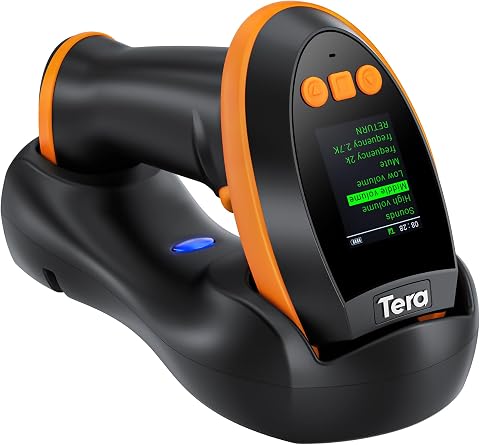
The Tera HW0009 is a versatile wireless barcode scanner featuring a customizable screen for setting adjustments. It offers fast, accurate reading of various barcode formats, including high-density and challenging types, with a large 2500mAh battery for all-day use.
Pros:
- Customizable screen for personalized settings
- Fast and accurate barcode scanning including high-density formats
- Multiple connection options with long wireless range
- Large battery supports all-day operation
Cons:
- Requires pairing setup via barcode scan
- Bulkier design due to screen and cradle
- Potentially complex configuration for some users
Best for: Stores needing a compatible scanner for product or QR workflows
Not ideal for: Merchants assuming code scanning itself confirms crypto payment
Bottom line: Verify the Tera scanner’s model, connection, and software compatibility for the exact scan task.
Build the checkout around the payment provider and point of sale system first, then prioritize the equipment required for that workflow. Confirm the core payment terminal or tablet setup, followed by any scanner or receipt printer the system supports. Add NFC or handheld options only when their roles and compatibility are clear. This workflow-first order helps keep purchases tied to actual checkout needs.
You do not need to solve every hardware choice at once. Write down how a customer pays, how staff confirm completion, and how the transaction is recorded; use those steps to guide conversations with your vendors. With the right compatibility checks and a clear staff process, you can build a practical checkout plan one decision at a time.